Every website has two stories.
The first one is visible. It is the story users experience when they land on a page: the design, the content, the navigation, the calls to action, and the overall feeling of the brand.
The second story is harder to see. It lives behind the interface, inside the performance metrics, accessibility rules, SEO structure, third-party scripts, technical dependencies, browser behavior, and small implementation details that quietly shape the quality of the experience.
Most website audits try to reveal that second story. The problem is that they often do it in a fragmented way. One tool reports performance issues. Another one highlights accessibility problems. A different one checks SEO. Screenshots end up in one place, raw JSON in another, and the final report becomes a mix of technical signals that still need to be interpreted, organized, and explained.
That gap is what led me to build Audit Studio.
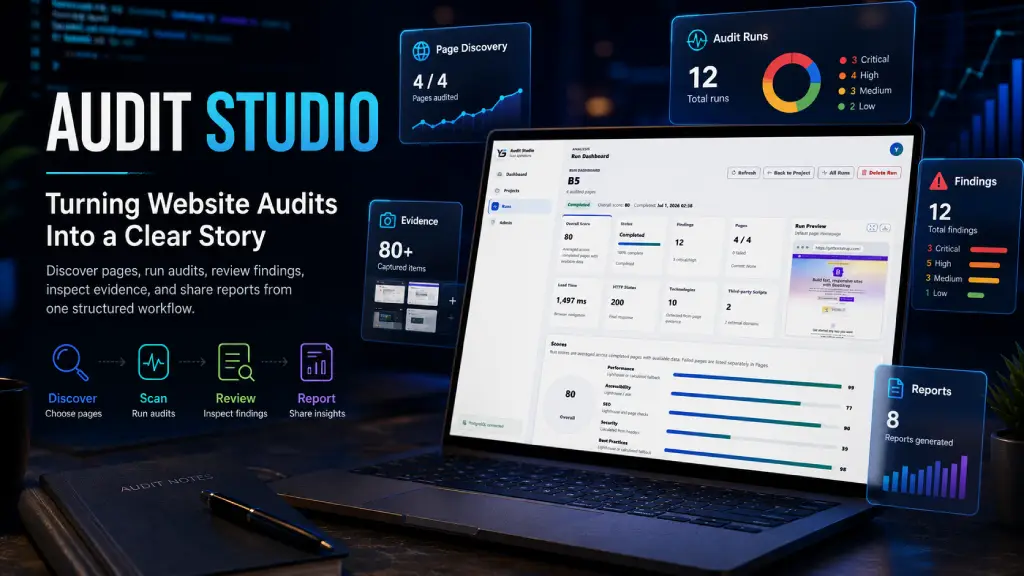
Audit Studio is a private website audit platform designed to make technical website reviews easier to run, easier to understand, and easier to share. It brings the audit process into a single workflow: create a project, discover relevant pages, choose what to scan, run the audit, review the results, inspect the evidence, and generate a report that can actually be used.
The goal was not to build another scanner. The goal was to build a product that helps turn scattered technical findings into a clear story about the health of a website.
Why I built it
Website audits can produce a lot of information very quickly. That sounds useful, but in practice it can become overwhelming.
A scan may return performance scores, accessibility violations, SEO warnings, best-practice recommendations, security observations, network issues, screenshots, console messages, and technology detections. Each individual result may be valid, but without structure, the audit becomes noise.
The real challenge is not only finding problems. The real challenge is understanding which problems matter, where they happen, how often they appear, and what evidence supports them.
I wanted Audit Studio to solve that part of the process.
Instead of treating an audit as a single technical operation, Audit Studio treats it as a workflow. A website belongs to a project. A project can have multiple audit runs. Each run can include multiple pages. Each page can have its own findings, metrics, screenshots, and artifacts. The final result is not just a score; it is a structured view of what was reviewed and what was discovered.
That structure makes the audit easier to trust.
From a URL to a guided review
Most audits start with a simple question: “How is this website doing?”
But a website is rarely represented by a single page. The homepage may be polished, while internal pages may have missing metadata. A landing page may load quickly, while another page may include heavy third-party scripts. Some issues may be global, while others may only appear in specific sections.
Audit Studio starts by helping the user discover candidate pages from the target website. This discovery step gives the audit more intention. Instead of blindly scanning everything or manually collecting URLs, the user can review the discovered pages and decide which ones should be included.
Once the pages are selected, Audit Studio creates an audit run and processes it in the background. The system executes the scan, captures metrics, stores evidence, detects technologies, generates artifacts, and prepares the results for review.
This creates a more natural audit experience. The user is not just pressing a button and waiting for a report. They are planning the scope of the audit, executing it, and reviewing the outcome in context.
Making the results easier to read
One of the most important parts of Audit Studio is the dashboard.
A good audit dashboard should not simply display numbers. It should help the user understand what those numbers mean.
Audit Studio organizes the results across areas such as performance, accessibility, SEO, security, best practices, diagnostics, and detected technologies. Findings are grouped by category and severity, so the user can quickly identify where the biggest concerns are.
The dashboard is designed to answer practical questions:
- What is the overall condition of the website?
- Which pages were reviewed?
- Which areas are performing well?
- Where are the main weaknesses?
- Which findings should be reviewed first?
- What evidence is available?
This is where the audit starts to become useful. Instead of forcing the user to interpret raw tool output, Audit Studio gives the results a shape.
Page-level context
One of the lessons behind Audit Studio is that page-level context matters.
A broad finding like “SEO issues were detected” is not enough. The useful question is: where? Is the issue on the homepage? Is it repeated across every page? Is it isolated to one landing page? Is it caused by missing metadata, duplicate content, broken structure, or something else?
Audit Studio allows each audited page to be reviewed individually. A user can open a page detail view and inspect its metrics, findings, screenshots, artifacts, and technical evidence.
This makes the results more actionable. Developers can trace issues faster. Project owners can prioritize better. Stakeholders can understand the difference between a site-wide problem and a page-specific issue.
It also helps reduce confusion in multipage audits, where duplicate or repeated findings can easily make a report feel larger and more difficult to understand than it really is.
Evidence that supports the findings
A useful audit should not feel like a black box.
Audit Studio stores artifacts generated during the audit process, including screenshots, logs, raw JSON, technology profiles, generated reports, and export packages. These artifacts help explain how the results were produced and give users a way to validate the findings.
This matters because technical reports are often shared with people who were not involved in the scan. When a client, manager, or stakeholder reviews the report, evidence makes the findings easier to trust.
The platform was built with that traceability in mind. A finding should not just say that something is wrong. It should point to the context behind it.
Understanding what the website is built with
A modern website is rarely just a few pages and stylesheets. It usually depends on frameworks, libraries, CMS features, analytics tools, embedded widgets, tracking scripts, plugins, and third-party services.
That is why Audit Studio includes technology detection.
By identifying the technologies used by a website, the audit gains another layer of meaning. The user can see not only what issues were found, but also what the site appears to depend on.
This is especially useful when reviewing long-term maintainability and risk. An outdated library, an unnecessary third-party script, or an unknown external dependency may not be visible to a normal user, but it can still affect performance, security, privacy, and stability.
Audit Studio can also enrich technology findings with AI-assisted summaries. These summaries help explain potential concerns, exposure, upgrade considerations, and missing security signals in a more readable way.
The result is a better understanding of the website as a system, not just as a collection of pages.
Reports that are actually useful
An audit only creates value when the results can be used by someone.
That is why reporting and sharing are an important part of Audit Studio. The platform can generate reports in multiple formats, including Markdown, HTML, PDF, and ZIP packages with supporting artifacts.
Different audiences need different formats. A developer may prefer a Markdown report that is easy to copy into a ticket or documentation. A client may prefer a PDF. A technical team may need a ZIP package with the full evidence. An external stakeholder may only need temporary access to a shared report.
Audit Studio supports temporary report links, allowing selected results to be shared without giving full access to the system. This keeps the workflow practical while still preserving control over who can see the audit.
Built around real workflow needs
Audit Studio was shaped by the kinds of problems that appear during real website reviews.
- There is the need to define scope.
- There is the need to review more than one page.
- There is the need to avoid drowning in repeated findings.
- There is the need to keep evidence attached to the results.
- There is the need to explain technology risks in plain language.
- There is the need to generate a report that someone can actually read.
- There is the need to share results without exposing the whole system.
Each part of the platform exists because of one of those needs.
Projects keep work organized. Discovery helps define what should be scanned. Audit runs preserve history. Dashboards make results easier to understand. Page details make findings actionable. Artifacts provide evidence. Technology detection adds context. Reports make the work shareable.
Together, these features turn the audit into a complete product experience.
The product value
The most important value of Audit Studio is clarity.
A website audit can generate hundreds of signals, but signals alone are not enough. Without structure, they become noise. With the right workflow, they become insight.
Audit Studio helps turn technical data into a narrative:
- This is the website we reviewed.
- These are the pages we selected.
- This is how the site performed.
- These are the strongest areas.
- These are the weakest areas.
- These are the issues that matter most.
- This is the evidence behind them.
- These are the technologies involved.
- This is what should be reviewed next.
That is the product idea in its simplest form.
Audit Studio is not just about finding issues. It is about making the audit understandable enough that someone can act on it.
Final thoughts
Modern websites are complex. They are built from many layers, and their quality cannot be explained by a single score.
Audit Studio provides a structured way to inspect that complexity. It brings together page discovery, automated scanning, dashboards, page-level evidence, technology detection, reporting, exports, and sharing into one focused workflow.
The result is a platform that helps make website audits more organized, more transparent, and more useful. It does not just collect problems. It helps tell the story behind them.