Every developer has had that moment.
You open a project, start exploring the codebase, and quickly realize that the real challenge is not just understanding what the application does. The harder part is understanding where the risks are hidden.
Is authentication configured correctly?
- Are there secrets sitting in configuration files?
- Are database queries safe?
- Are there authorization gaps?
- Is the frontend carrying legacy scripts nobody uses anymore?
- And maybe the most important question: where should the team start?
That was the problem I wanted to solve.
Not by creating another generic checklist. Not by asking AI to “review this code” and hoping for the best. I wanted something more consistent, more structured, and more useful for real engineering decisions.
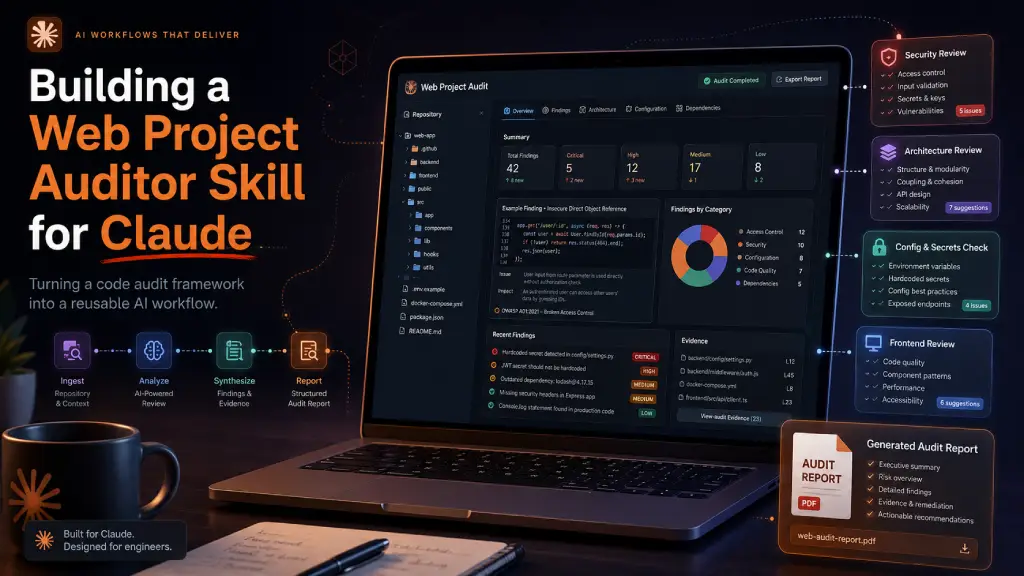
That idea became Web Project Auditor, a Claude Skill designed to perform read-only, evidence-based audits of web application codebases.
You can find the skill here:
GitHub Repository: yygarcia89/Web-Project-Auditor: Claude Skill designed to perform read-only, evidence-based audits of web application codebases.
The Problem with Generic AI Code Reviews
AI is already useful for code review, but generic prompts tend to produce generic results.
Ask an AI assistant to “audit this project,” and you might get a long list of broad best practices:
- improve security
- validate inputs
- add logging
- review dependencies
- optimize performance
Those points may be true, but they are not always actionable.
For a real audit, I wanted the assistant to behave more like a structured reviewer. It should inspect the repository, find actual evidence, organize the findings, and explain why each issue matters.
The goal was not to replace a senior developer. The goal was to create a repeatable workflow that helps developers and teams reach a better starting point faster.
The Starting Point: AuditStudio.AuditEngine
Before creating the Claude Skill, I had already built a structured audit framework called AuditStudio.AuditEngine.
The engine defined the foundations of a code audit:
- audit instructions
- domain-specific rules
- severity, effort, and confidence scales
- output templates
- validation rules
- specialized review areas
- Sitefinity, ASP.NET Core, EF Core, JavaScript, and Kendo UI guidance
This was important because a good AI workflow needs constraints.
Without structure, the model can drift.
With structure, the model can focus.
AuditStudio.AuditEngine gave the skill a clear methodology: inspect code, collect evidence, classify risk, generate reports, and validate the final audit package.
Why a Claude Skill?
Claude Skills are useful when you have a repeatable workflow that should not depend on rewriting the same instructions every time.
In this case, the workflow was clear:
- Inspect a web project.
- Detect the stack.
- Load the relevant audit rules.
- Analyze security, maintainability, performance, configuration, authorization, data integrity, frontend consistency, and more.
- Produce a structured audit package.
- Validate the output.
Instead of keeping this as a long prompt, I packaged the workflow into a reusable skill.
That means Claude can understand when the skill is relevant and automatically apply the right process when I ask something like:
Audit this repository.
or:
Perform a security review of this ASP.NET Core project.
or:
Review this Sitefinity renderer project and generate an audit report.
What the Skill Does
The Web Project Auditor skill is designed to audit a repository without modifying the application source code.
That read-only constraint is intentional.
When auditing a project, the first goal is not to fix everything immediately. The first goal is to understand the system clearly enough to make good decisions.
The skill focuses on areas such as:
- stack and architecture overview
- security risks
- authorization boundaries
- validation and input handling
- data integrity
- Entity Framework Core usage
- configuration and secrets exposure
- performance risks
- frontend JavaScript consistency
- Kendo UI patterns
- Sitefinity-specific risks
- error handling and logging
- dead code and cleanup opportunities
- business impact
- priority roadmap
- cognitive friction
One of my favorite parts is the cognitive friction analysis.
This goes beyond traditional security or performance findings. It looks at how difficult the project is to understand, maintain, onboard into, and safely change. That kind of insight is especially valuable in legacy projects or applications that have evolved quickly over time.
Evidence Over Assumptions
One of the most important rules in the skill is simple:
No finding should exist without observable evidence.
That means the audit should not say “this project may have authorization issues” unless it can point to specific files, methods, components, configuration, or patterns that support the finding.
Each finding follows a structured format:
- severity
- priority
- area
- impact scope
- location
- evidence
- risk
- recommendation
- estimated effort
- regression risk
- test impact
- confidence
- manual validation flag
This makes the final report much easier to use.
A developer can jump directly to the file.
A lead can understand the risk.
A product owner can see the business impact.
And the team can decide what to fix first.
The Output: A Real Audit Package
The skill does not just return a chat response.
It generates a complete audit package with a predictable structure:
This structure matters because audit results should be easy to review, share, and compare over time.
The summary.md is written for stakeholders.
The full-report.md consolidates the complete audit.
The metadata.json gives a machine-readable overview.
The details/ folder contains the deeper technical analysis.
This turns the audit into something closer to a professional deliverable, not just a one-time AI response.
Designing the Skill
The skill itself follows a layered structure:
The SKILL.md contains the core workflow and instructions.
The references/ folder contains the deeper audit framework, including domain rules, report templates, scoring definitions, and Sitefinity release intelligence.
The scripts/ folder adds small utilities for initializing and validating the audit package.
This separation keeps the skill focused while still giving Claude access to deeper documentation when needed.
That was one of the biggest lessons from building this: a good skill should not be a huge wall of instructions. It should guide the model, then let it load more specific context only when the task requires it.
Making It Useful for Real Projects
I wanted this skill to be useful across different kinds of web applications, but especially the kind of projects I work with often:
- ASP.NET Core applications
- Sitefinity CMS projects
- .NET Core Renderer projects
- EF Core data access layers
- legacy JavaScript-heavy applications
- Kendo UI-based admin interfaces
- applications with complex configuration and deployment history
The skill is not limited to those stacks, but it includes stronger domain guidance for them.
For example, in a Sitefinity project, the skill can look for CMS and renderer version patterns, configuration risks, widget structure, frontend dependencies, and migration-related concerns.
For an ASP.NET Core project, it can focus on middleware order, authentication, authorization, dependency injection, configuration, data access, and environment-specific settings.
For frontend-heavy projects, it can review script organization, legacy dependencies, DOM manipulation risks, duplicated UI logic, and maintainability issues.
The idea is not to make the skill “smart” in a vague way. The idea is to make it context-aware.
What I Learned
The most important lesson was that AI works better when the workflow is explicit.
A skill is not just a prompt. It is a small operating manual.
It tells the model:
- when to activate
- what to inspect
- what not to do
- which files to generate
- how to format findings
- how to validate the result
- when to admit uncertainty
That last part matters.
A good audit should not pretend to know everything. If the repository does not provide enough evidence, the skill should say so. If a finding needs manual validation, it should mark it clearly.
That honesty makes the output more trustworthy.
Why I’m Publishing It
I decided to publish this skill because I believe AI-assisted code audits can be much better when they are structured, reusable, and transparent.
Instead of keeping the workflow hidden in a private prompt, I wanted to package it in a way that others can inspect, improve, fork, and adapt.
The GitHub repository will include the skill folder, usage instructions, and examples of how to run audits with Claude Code.
GitHub Repository: yygarcia89/Web-Project-Auditor: Claude Skill designed to perform read-only, evidence-based audits of web application codebases.
My hope is that this becomes a useful starting point for developers who want to bring more consistency to their project reviews, especially when dealing with complex web applications or legacy systems.
Final Thoughts
Building this skill reminded me of something important: AI does not replace engineering judgment. but it can help organize it. A structured audit workflow gives the model a better frame. It turns a vague request like “review this project” into a repeatable process with evidence, priorities, and deliverables. For me, that is where AI becomes most valuable in software development. Not as a magic reviewer. Not as a replacement for experience, but as a disciplined assistant that helps us see the codebase more clearly. And sometimes, seeing clearly is the first step toward improving everything else.