One of the most interesting things about AI-assisted development is that the real value does not always come from asking the model to generate more code. Sometimes the bigger improvement comes from teaching the model how a specific workflow should be executed.
That was the idea behind the Sitefinity Renderer Widget Builder skill.
I had been working with Sitefinity ASP.NET Core Renderer widgets, and the pattern was familiar enough to repeat: create a widget, define its editable properties, build a model, prepare a view model, render the Razor view, and keep the implementation aligned with the project structure. The challenge was not that any single widget was difficult to create. The challenge was consistency. Every time a new widget was needed, the same architectural expectations had to be repeated, reviewed, and sometimes corrected.
A generic AI prompt can help with scaffolding, but it does not always understand the conventions of a real project. It may generate code that looks reasonable, but still place multiple types in the same file, skip interfaces, put business logic directly inside a ViewComponent, or create a folder structure that does not match the rest of the application. Those are not always compilation errors. In many cases, the code works. But working code is not the same as maintainable code.
That is why I decided to create a Claude Skill for this workflow.
You can find the repository here:
GitHub Repository: yygarcia89/Sitefinity-Renderer-Widget-Generator
The Problem I Wanted to Solve
Creating a Sitefinity Renderer widget is not just about producing a ViewComponent and a Default.cshtml file. In a maintainable ASP.NET Core Renderer project, the widget usually has several responsibilities that should remain separated. The component should act as the entry point, the entity should define the persisted widget settings, the model should contain the logic required to build the widget output, and the view model should expose only the data required by the Razor view.
That separation is important because widgets tend to grow over time. A simple content block may later need conditional rendering, image handling, content selectors, external data, or layout variations. If the first version is generated as a compact file with mixed responsibilities, the widget becomes harder to extend later. The issue is not only about style. It affects readability, reviewability, and the long-term cost of maintaining the code.
When using AI to generate this type of code, I noticed that the model could understand the general idea but not always the exact engineering expectations. It could generate the correct types, but not necessarily the correct physical file structure. It could include a model and a view model, but sometimes combine them in the same file. It could create a working ViewComponent, but place too much logic inside it.
That made the problem clear: I did not need a better one-time prompt. I needed a reusable workflow that could encode the architecture rules directly into the AI assistant’s behavior.
Why a Claude Skill Made Sense
Claude Skills are useful when a task is repeatable and benefits from clear instructions, reference material, templates, and validation rules. Instead of asking the model to follow a long prompt every time, a skill packages the workflow into a structured folder. That makes it easier to reuse the same expectations across different conversations and different tasks.
For this case, the skill needed to do more than describe Sitefinity widgets. It needed to guide Claude through the process of planning, generating, and reviewing a widget implementation. The goal was to make Claude behave less like a blank code generator and more like an assistant that already understands the preferred architecture for this type of work.
The workflow became very specific. Before generating code, the skill should understand what the widget is supposed to do, identify which properties should be configurable in the Sitefinity editor, define the entity, define the model interface, create the model implementation, prepare the view model, generate the ViewComponent, and place the Razor view in the expected renderer folder. It should also add XML comments to generated classes, methods, and properties so the resulting code is easier to understand and maintain.
Most importantly, the skill needed to be strict about file separation. In this workflow, each public type should live in its own file. The Entity, Model, ViewModel, Interface, and ViewComponent should not be combined just because the implementation is small. That rule sounds simple, but making it explicit significantly improved the generated output.
Building the Skill from Documentation and Examples
The skill was built from a combination of official documentation, public examples, and project-specific rules. That combination matters because documentation alone is often too generic, while project rules alone may lack the framework context needed to generate correct code.
The first source was the Claude Skills guide. That provided the foundation for how the skill should be organized. A skill needs a SKILL.md file with clear frontmatter and instructions, and it can also include supporting folders like references, scripts, and assets. That structure was useful because I did not want the skill to become one massive instruction file. I wanted the main workflow to stay focused while deeper rules, templates, and validation notes lived in supporting files.
The second source was the official Sitefinity documentation for ASP.NET Core Renderer widgets. That gave the skill the correct framework vocabulary and implementation model. Sitefinity Renderer widgets are built around ASP.NET Core patterns such as ViewComponents, Razor views, widget entities, and dependency injection. The skill needed to respect those concepts instead of inventing a custom structure that looked clean but did not match how renderer projects are expected to work.
The third source was public Sitefinity repositories. Documentation explains the concepts, but repositories show how those concepts appear in real code. Public examples help clarify naming conventions, folder organization, and practical implementation details that are easy to miss when reading documentation alone. Using those repositories as reference material helped make the skill more grounded.
The final source was my own project experience. This was the part that turned the skill from generic documentation into a practical developer workflow. I defined the rules that mattered to me: keep components thin, place logic in models, use interfaces, generate XML comments, produce a file manifest, and avoid combining public types into the same file. Those expectations became part of the skill instead of remaining as corrections I would have to repeat manually.
The First Version Was Useful, but Not Complete
The first version of the skill worked better than a normal prompt. It created the main pieces of the widget and followed the general direction I wanted. That was encouraging because it proved the idea was valid. The AI could use a skill to generate something closer to the expected project structure.
However, the first version also exposed an important issue. Even though the skill described the desired architecture, it was not strict enough about physical files. Claude created the right types, but sometimes grouped multiple types together. From a code generation perspective, that can feel efficient. From a project maintenance perspective, it was not what I wanted.
This was a useful failure because it revealed an implicit assumption. As a developer, when I say “create an entity, a model, a view model, an interface, and a component,” I naturally expect separate files. But the model does not always infer that unless the instruction is explicit. It may optimize for brevity, reduce the number of files, or produce a compact example that is easier to display in chat.
The fix was not to tell Claude to “try harder.” The fix was to update the skill with non-negotiable rules. The next version required a file manifest before implementation, enforced one public type per .cs file, and clearly stated that entities, models, view models, interfaces, and components must not be combined. That change made the output much closer to the architecture I wanted.
What the Skill Generates
The Sitefinity Renderer Widget Builder skill is designed to produce a complete widget scaffold that can be copied into an ASP.NET Core Renderer project. The expected output is not just a code snippet. It is a small package of files with clear responsibilities.
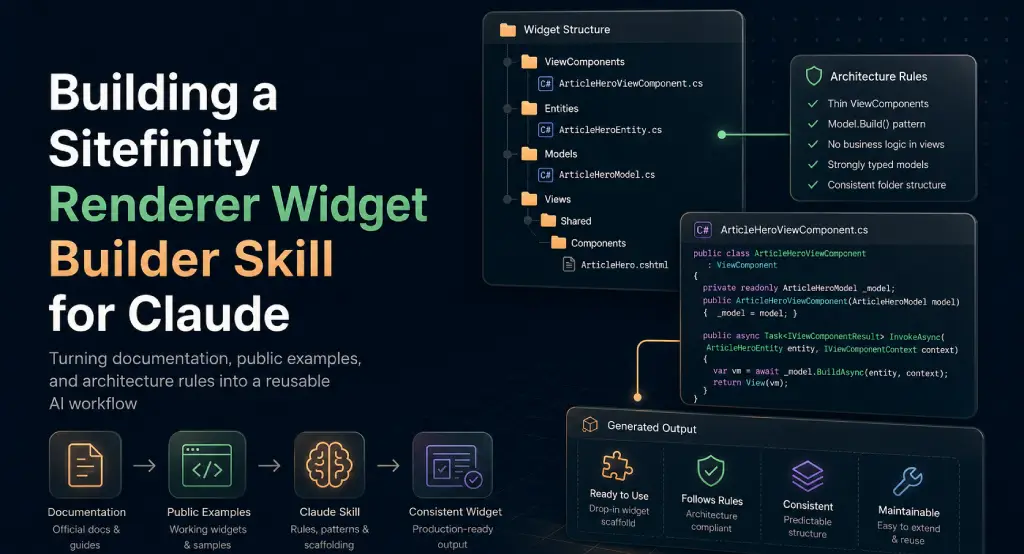
A typical widget structure looks like this:
The ViewComponent is responsible for receiving the Sitefinity widget context and delegating the work. It should remain thin and should not become the place where business logic accumulates. The Entity represents the persisted configuration exposed through the Sitefinity editing experience. The model interface defines the contract for building the widget output, and the model implementation contains the logic required to transform the entity and any supporting data into a view model.
The ViewModel exists for the Razor view. It should not mirror the entity blindly, and it should not contain unnecessary data. Its purpose is to make the view simple, readable, and focused on rendering. The Razor file should receive a prepared model and avoid carrying business logic that would be harder to test or reuse.
For more advanced widgets, the skill can also generate additional files, such as item view models, option classes, service abstractions, mapping helpers, or supporting constants. The same rule still applies: if the type matters enough to be public, it should have its own file.
Designing the Skill Structure
The skill itself follows a structure that mirrors the same principle of separation. The main SKILL.md file contains the core instructions, activation guidance, and workflow. The references folder contains more detailed rules, such as architectural expectations, file separation guidance, implementation notes, and review checklists. The assets folder contains reusable templates, including a component file manifest. The scripts folder can include validation helpers that check whether the generated output follows the expected structure.
This structure is important because a skill should be useful without becoming overloaded. If every detail is placed directly into SKILL.md, the instructions can become harder to scan and harder to maintain. By moving deeper guidance into references, the skill can keep the main workflow clean while still making additional context available when needed.
That design also makes the skill easier to improve over time. If the AI misses a convention, I can add a rule. If a new widget pattern becomes common, I can add an example. If a validation step becomes useful, I can add or update a script. The skill becomes a living workflow rather than a static prompt.
This is one of the reasons I find skills more interesting than long prompts. A prompt is usually disposable. A skill can become an asset.
The Role of Planning Before Code Generation
One of the biggest improvements in the workflow was making planning part of the output. Before code is written, the skill should produce a file manifest and identify what each file is responsible for. That small planning step helps avoid vague generation and gives the implementation a clear target.
For example, before creating a widget, the skill should reason through what properties belong in the entity, what data belongs in the view model, and what logic belongs in the model. It should also clarify whether the widget needs external services, content retrieval, collection rendering, conditional display rules, or only static editor-configured properties.
This planning step makes the generated code easier to review because the file structure is visible before the implementation begins. If something looks wrong in the manifest, it can be corrected early. That is much better than reviewing a completed implementation and then asking the AI to reorganize the entire output afterward.
In practice, this makes the AI feel more like a structured development assistant. It does not jump directly from request to code. It first establishes the shape of the solution, then generates files that match that shape.
Rules Make AI Output More Reliable
The most important lesson from this process is that rules improve AI output when they remove ambiguity. The skill did not become better because it used complicated language. It became better because the expectations were specific.
A rule like “keep the ViewComponent thin” is helpful, but it can still be interpreted in different ways. A stronger rule explains what that means in practice: the ViewComponent should receive the context, call the model’s build method, and return the view with the generated view model. It should not contain content mapping logic, formatting logic, or decision-heavy rendering logic.
The same applies to file separation. Saying “use clean architecture” is too vague. Saying “generate one public type per .cs file and do not combine Entity, Model, ViewModel, Interface, or ViewComponent in the same file” is much more actionable.
This is where AI-assisted development starts to become more dependable. The more the workflow captures real engineering decisions, the less the model has to guess. The goal is not to restrict the AI unnecessarily. The goal is to remove decisions that have already been made by the project architecture.
Why I’m Publishing the Repository
I decided to publish the skill because I think this pattern is useful beyond a single project. Many developers are already using AI to generate code, but the next step is to make those workflows reusable, inspectable, and easier to improve.
The repository includes the skill files, usage guidance, references, templates, and validation ideas. It is intended as a starting point for developers working with Sitefinity ASP.NET Core Renderer projects who want AI assistance while still preserving architectural consistency.
GitHub Repository: yygarcia89/Sitefinity-Renderer-Widget-Generator
The repository is also an example of a broader idea: developer workflows can be packaged. If a task has repeated rules, repeated structure, repeated corrections, and repeated review expectations, it is a good candidate for a skill. That does not mean every task needs one. But when a workflow is common enough, creating a skill can reduce friction and improve consistency.
Publishing it also creates a feedback loop. If the skill misses something, it can be updated. If a better pattern appears, it can be added. If a validation script becomes more useful, it can be improved. The skill can evolve in the same way a small internal tool or project template evolves.
What I Learned
The biggest improvement did not come from asking the AI to be smarter. It came from making my expectations clearer.
That was the most useful takeaway from this experiment. The first version worked because the general workflow was captured. The second version worked much better because the implicit rules became explicit. Once file separation, XML comments, model responsibilities, ViewComponent responsibilities, and manifest generation were clearly defined, the output became much closer to what I would have created manually.
This changed how I think about AI-assisted development. I still use prompts, but I now see more value in reusable workflows for repeated tasks. A good prompt can solve a problem once. A good skill can make the solution repeatable.
It also reinforced the idea that AI works better with constraints. Constraints do not make the output less creative when they are tied to real engineering decisions. They make the output more useful. They tell the model which parts of the solution are already decided, so it can focus on the parts that actually need adaptation.
Final Thoughts
Building the Sitefinity Renderer Widget Builder skill started as a way to scaffold widgets faster, but it became a useful exercise in workflow design. It forced me to define what I actually expect from a good widget implementation and then package those expectations into something reusable.
That is where I think AI-assisted development is heading. The value will not only come from better models or bigger context windows. It will also come from better ways to capture how we work: our architecture decisions, our review habits, our naming conventions, our templates, our validation steps, and our definition of quality.
A vague request can produce useful code, but a structured workflow can produce code that is easier to trust.
That is why I like this approach. It does not remove the developer from the process. It gives the developer a better starting point. The skill does not decide the architecture for me. It preserves the architecture I already want and helps the AI follow it consistently.
For me, that is the real promise of tools like Claude Skills: not just faster code generation, but reusable engineering guidance.